How can we help?
Customer Helpline: 0800 092 41 21
Email: info@macaulayscott.co.uk
SEND FILES
How can we help?
Customer Helpline: 0800 092 41 21
Email: info@macaulayscott.co.uk
SEND FILES
We accept
artwork and digital files from most digital storage media, email, cloud, and upload via our website.
By using
our tips below your digital artwork should be good to print. If you have trouble,
just get in touch. We have a wealth of experience getting the most challenging
of jobs to print.
Your files are checked free of charge. We will always offer advice on the best way to achieve your goal.
FILE FORMATS
PDF is the
preferred format for print
If you can export from your app to a PDF file, please do so using the ‘High Quality’
or ‘Press Quality’ setting if available.
JPG, Photoshop
PSD, TIFF and images within documents
For best quality, colour and greyscale images should be at least 300dpi at their finished print
size. Black and white images should be 600dpi or more at
their finished print size.
For photo printing please send the original file at actual size. Photos downloaded from Facebook or WhatsApp may not be good enough to print.
Lower resolution images may be pixelated or blurred when printed.
Microsoft Office documents (.docx,
.xlsx, .pptx .pub)
We canprint from Office files though there
are caveats outlined in the sections below. Where possible save/export your
document as a PDF using the ‘Standard (publishing online and printing)’ setting.

Canva Documents
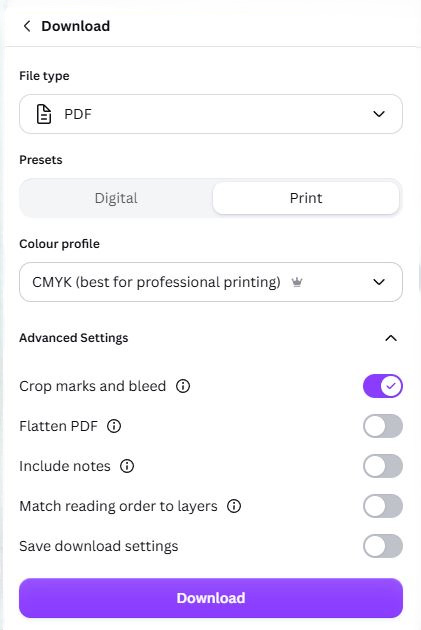
We are happy to accept your Canva creations for printing. Please ensure your document size is correct for the finished printed item. When you are ready to send to us click share > download and choose PDF Print file using the settings below. Then download and forward us the PDF.

AI Generated Documents
To achieve the best print results, please include the finished size, orientation, bleed and resolution in your AI prompt. For example: "Create a print-ready A4 portrait design with 3mm bleed on all sides, 300dpi resolution, and all important text and graphics kept within a 5mm safe margin from the trim edge."
The bleed ensures backgrounds and images extend beyond the finished size to prevent white edges after trimming, while safe margins help prevent important content from being cut off.
AI-generated text can often contain spelling errors or distortions, so we recommend adding text separately where possible.
For best results, supply artwork as a high-resolution PDF and carefully review all content before submission, as issues that are not obvious on screen may become noticeable when printed.
COLOUR PRINTING
It is unlikely your home monitor and printer will display colours accurately. You will need to see a colour swatch in-store to view how printed colours will appear on paper.
OTHER FACTORS
Fonts
While we have an extensive font library, if you have used any special fonts in your design please make sure they are embedded in your PDF or converted to curves.
Bleed
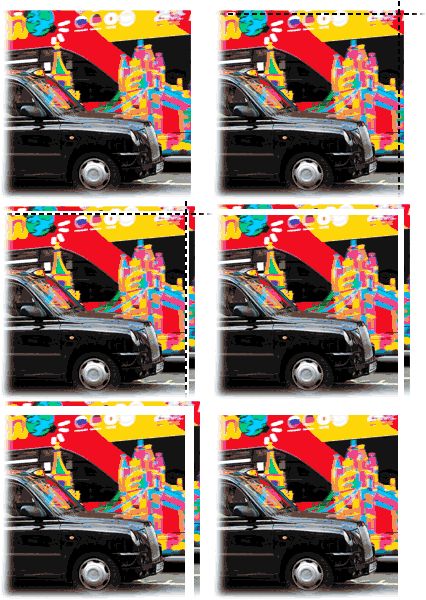
All items that are printed to the edge of the page require bleed. This is the area of the design
that goes beyond the edge of the sheet, which will be trimmed off on the finished product. (see images below).
Standard print items require at least 2mm bleed. Banner and supersize products require 5mm bleed.
If you cannot add bleed in your application or need further advice please get in touch.